This was the single most feature-rich week in ElastOS history. In seven days, the team shipped 51 commits across 189 files, adding roughly 34,000 lines of code, including a complete creator-to-consumer publishing pipeline, a marketplace redesigned to Apple standards, an AI skills system that lets you teach your personal AI new abilities, and a backup system where a single 12-word phrase recovers your entire digital life. With V1.1 shipped this month, all this work is gearing up to be released in V1.2, let’s get stuck in!
What Shipped: The Big Picture
Eight major systems went from development to working product in a single sprint:
- ElastOS Runtime, Dashboard, Front Door, and v2 Convergence, the main screen and underlying architecture advancing toward a security model where every app and AI agent runs in its own locked room
- Creator Dashboard and Publishing Pipeline, a 3-step wizard that takes any file, encrypts it, and lists it for sale on the marketplace
- AI Agent Upgrade, Skills, Voice, and Agent Desktop, teach your AI new abilities, talk to it instead of typing, and let it create desktop windows, all powered by the latest OpenClaw release
- Elacity Market Apple-Grade Redesign, the entire storefront rebuilt with Apple design standards, full accessibility, and smooth animations
- Secure Backup and Restore, your 12-word recovery phrase is now the single key to your entire digital life
- Walk-Away Independence, the system now keeps running even if any single external service goes offline
- Post-Quantum Cryptographic Audit, every piece of encryption was checked for readiness against future quantum computers
- Smart Contract Update, V3 Protocol, the rules governing how digital content is bought, sold, and accessed received a significant upgrade
In parallel, the Elastos ecosystem advanced on several fronts, the DAO name change was submitted, developer onboarding for multi-chain ELA began, and a 5-agent automated marketing system was deployed.
1. ElastOS Runtime, Dashboard, Front Door, and v2 Convergence
The ElastOS Runtime v2 will be the main software that runs on your personal computer under the hood, think of it as the operating system for your digital life. If ElastOS v1 delivered a house you own the key to enter inside, v2 is about adding locks to all the rooms and a security system. This week, the team continued focus on advancing this goal. Here is why this matters so much. Think of your computer today: when you install an app (like a photo editor), that app can basically see everything, your files, your photos, even your passwords if they are stored somewhere. You just trust it not to be evil. Runtime v2 changes that completely. Instead of trusting apps, it treats every app like an untrusted stranger. Every app runs in its own locked room (called a “capsule”), and it cannot do anything unless it has a signed permission slip (called a “capability token”).
Imagine a building with a security desk. The Runtime is the security desk, it checks IDs, issues visitor badges, and logs who goes where. Capsules are the rooms, each app runs in its own sealed room and cannot see into any other room. When the photo editor needs to read a photo, it asks the security desk for a badge that says “can read vacation.jpg for 1 hour.” The badge expires, and the whole interaction is logged. No app gets blanket access to your entire system ever again. This is especially critical for AI agents. If you let an AI assistant access your files, you do not want it reading your medical records when you only asked it to edit a document. Runtime v2 gives each AI agent a very specific, time-limited permission, “you can read this one file for 30 minutes”, and nothing more.
- Dashboard navigation improved, arrow keys are more reliable, tab movement is cleaner, and screen flickering was eliminated.
- Complete demo loop working, you launch ElastOS, land in PC2, open Chat, and return home cleanly. The MyWebSite feature (your own personal website hosted from your computer) is accessible directly from the dashboard
- Identity stays consistent, your nickname now shows the same way whether you are in chat, on your profile, or in the dashboard. Before, it could show differently in different places
- Unfinished features hidden, only ready-to-use apps are visible on the main screen, so new users are not confused by half-built tools
- Session handling tightened, PC2 properly controls the screen when it launches, and features no longer fight each other for control
v2 Convergence, Building the Bridge to Capsules
Five features shipped this week that directly lay the groundwork for the capsule architecture:
- Prompt-level sandboxing, AI skills are now wrapped with trust boundaries that control what each skill can access. This mirrors how capsules will isolate every app in the future
- Hash verification on load, every skill gets a digital fingerprint checked against known-good values on startup. This is the same pattern capsules will use to verify that code has not been tampered with
- Audit logging, every skill load and every message processed is now recorded. This establishes the monitoring layer that capsule runtimes will require
- Capability manifests, all 7 app configuration files were enriched with detailed information about which APIs each app uses, what messages it sends, and what external services it connects to
- Namespace mapping, a translation document was created that maps every current file path to the new format Runtime v2 will use, so the migration path from v1 to v2 is clear and testable
Codebase Graph, Systematic Review and Testing
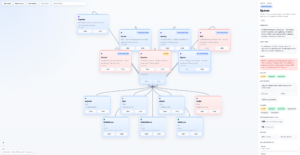
The team got the entire Runtime codebase graphed out for systematic review and testing. Every concept, folder, file, and function now has its own graph node that can be individually reviewed and connected to other nodes. Think of it like a map of a city, instead of wandering street by street, you can see the entire layout from above, identify which roads connect to where, spot dead ends, and find the most important intersections. This makes it significantly easier to see what code is being used and what is not, what is essential and what needs more work. AI-assisted development improved noticeably after setting this up, because the AI tools now have a structured understanding of how every piece of the codebase relates to every other piece.
2. Creator Dashboard, Three Steps to Protected Content
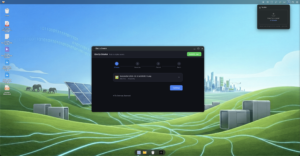
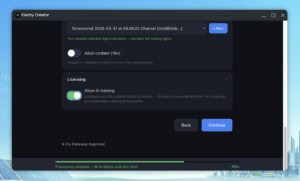
Publishing used to require technical knowledge and multiple manual steps. Now it is three steps: pick your file, set your price, hit publish. The system encrypts it, uploads it, and lists it on the marketplace automatically. Creators keep 95% of every sale, no middleman.
- Any file type, video, music, PDFs, AI models, 3D models, datasets. The system detects the format and generates a professional thumbnail automatically
- Drafts that save your progress, if your internet drops mid-publish, pick up where you left off with one click
- AI training licensing, creators choose whether their work can be used to train AI. An “AI Training Allowed” badge shows on the marketplace card so buyers know up front
3. AI Agent Upgrade, Skills, Voice, and Agent Desktop
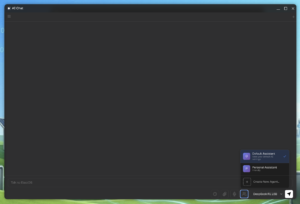
This week’s AI upgrade came from integrating the latest OpenClaw repository work, bringing three capabilities in one package: skills, voice, and agent-created desktop windows. Think of skills like apps for your AI, install one, and your assistant gains a new ability. Four ship out of the box: Wallet Operations, File Management, System Admin, and Elacity Market. Skills can also be bought and sold through the marketplace, with the goal to let the community build and share new AI abilities.
- Install and toggle per agent, turn skills on or off for each AI agent, with warnings if a skill needs extra permissions
- Tamper-proof, every skill is verified with a digital fingerprint on load. If someone modifies a skill file, the system refuses to run it
- Voice interface, talk to your AI instead of typing. It works like Siri or Alexa, but runs entirely on your own hardware with no data sent to the cloud
- Multi-agent teamwork, agents can now ask each other for help while staying within their own permissions. Your File Manager can request market data from your Market agent without accessing anything else
- Agent desktop windows, agents can create live dashboard windows on your screen (weather, stats, system health). Each window runs in a secure sandbox so it cannot touch your main desktop
4. Elacity Market, Apple-Grade Redesign
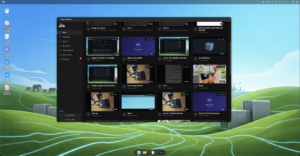
The marketplace is where people buy and sell digital content. If it looks amateur, nobody trusts it with their money. This week the entire storefront was rebuilt following Apple’s Human Interface Guidelines, the same design standards behind every iPhone app. Smooth animations, clean card layouts, smart search that remembers your history, and full keyboard/screen-reader accessibility (WCAG 2.1 AA).
5. Secure Backup and Restore
Your 12-word recovery phrase is now the single key to your entire digital life, identity, apps, AI agents, and settings. Think of it like a safe deposit box combination. Without it, the backup is just random noise. With it, you can restore everything onto a new computer in minutes. The login button stays greyed out until you confirm you have saved your phrase, because too many people skip this step and lose access permanently. 32 automated tests cover the full backup-restore cycle, including wrong phrases and corrupted files.
6. Walk-Away Independence
The system now keeps running even if any single external service goes down. Five backup connection points replace one hardcoded address. Your node checks disk space and bandwidth before sharing files, so popular content does not overwhelm your computer. A new readiness check runs on startup and tells you if anything is missing.
7. Post-Quantum Cryptographic Audit
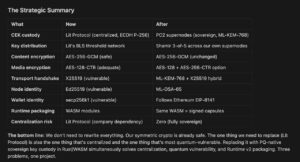
Quantum computers (expected 2030-2035) will break many of today’s encryption methods. The team audited every piece of cryptography in the system, mapped all trust boundaries, and flagged the Lit Protocol key management service as the highest-priority replacement target. A custom Rust component using a NIST-approved post-quantum algorithm is planned as the replacement.
8. Smart Contract Update, V3 Protocol
The rules governing how content is bought, sold, and accessed were upgraded: security audited and cleaned up, a new EventHub supports all system events, the subscription module was split into its own component for independent improvement, and the royalty-sharing system for collaborative content was fixed and capped.
Website and Portal Updates
portal.ela.city
- New weekly development report added to the Proposal #212 dropdown with full detailed breakdown
- Monthly delivery summary updated with cumulative March progress
- Media items in the Development Journal are now downloadable, right-click to save, or use the download button
- Community engagement features added to journal media
- Twitter/X feed now uses a persistent cache so the feed is never empty, even when the source API is temporarily unavailable
Elastos Content System
- A 5-agent automated marketing system was built and deployed, covering monitoring, drafting, writing, research, and quality assurance
- The system produces content continuously once running, the traditional equivalent would cost $3,000 to $8,000 per month
Documentation Portal
- A new documentation site was built with 80+ pages, covering getting started guides, API references, and architecture overviews
- 29 technical write-ups were produced from deep analysis of 43 repositories
- Available at docs.ela.city
What’s Next
- V3 contract migration, update the marketplace to use the latest smart contract rules so all buying and selling uses the newest, most secure protocol
- Lit Protocol production switch, move the encryption key network from test mode to live production and verify everything works end to end
- Large file encryption, test the pipeline with very large AI model files (4 to 70 gigabytes) using streaming encryption, so creators can sell AI models as protected digital assets
- App Build Pipeline, build the “App Factory” that takes source code, compiles it, stores it on the decentralised network, and registers it in the marketplace
- Content Intelligence, add fingerprinting for uploaded content to detect duplicates and protect creators’ rights
- Runtime v2 capsule prototyping, begin building the sovereign key custody system that will replace third-party dependencies and run inside next-generation secure containers
- Documentation portal launch, finalise and publish the updated docs portal so developers have a single, searchable source of truth
- Release V1.2!
Try ElastOS
- Desktop Launcher (Mac and Linux): Download Launcher
- Terminal Install (Mac/Linux): curl -fsSL https://raw.githubusercontent.com/Elacity/pc2.net/main/scripts/start-local.sh | bash
- NVIDIA Jetson: cd ~ && git clone https://github.com/Elacity/pc2.net.git && cd pc2.net && sudo bash scripts/install-arm.sh
- Docs: docs.ela.city | GitHub: github.com/Elacity/pc2.net
- Network Map: map.ela.city | Portal: portal.ela.city
- DAO Proposal: Keystone Fund Mandate
- Shipping Report: GitHub Discussion #8